Sunday, June 6, 2021

Best Remote Working Tools You Simply Need In 2021


1. Google Suite


Google Suite (G Suite) is a budget-friendly Google platform that allows your teams to collaborate on Google Docs, Google Sheets, and Google Slide, among other easy-to-use Google Drive tools. You can also share a team calendar and create work emails through the G Suite.

2. Microsoft Office Teams


While G Suite can be used entirely online within one platform, Microsoft Office Teams allows you to download apps like Excel, Outlook, Word, and PowerPoint to your computer or mobile device. Like G Suite, you also can use this general suite of tools to manage, share, store, and edit documents in team folders.

Aside from the more specific apps, Microsoft Teams also allows you to communicate with your teammates via video calls, email, and through an internal discussion platform where your colleagues can create posts or ask questions.


3. Slack

Slack is great for real-time communication for one-on-one conversations or with everyone on your team. You can also organize chats by subject, and integrate activity from platforms like Github, Trello, and Pingdom.

I like the thought expressed here that Slack is as close to a virtual office as you can get. You can even create one channel for every client, and invite only the people on that project to be on that channel.

(Want to learn more about Slack? Here's a guide to all the hacks you didn't yet know you could do with the platform.)

4. Colatform


Colatform is a Collaboration Platform for Teams and Remote working.

Colatform provides a workspace for Teams and Organizations' Teammates to collaborate with each other and has common features like Direct Messaging, Public and Private Channels, Group Messaging, Meetings, Group Audio, Video Calls, Enterprise Calendar, and Timesheet.

Colatform is an organizational collaboration workplace.

This means that for online and offline collaborations, inside and outside the organization, in small teams, or large organizations, all the requirements of each user, role, and department are answered.

Also, the architecture and design of Colatform are such that each of the stakeholders can easily perform their duties without interfering with others.


5. Trello

Trello allows you to create a dashboard that highlights large projects or categories and tasks related to them. Each small task, called a "card" can be labeled with a colored tag and text.

For example, if you want to say something is "Urgent" you could create a red card tag that says "Urgent" on it and stick it to the appropriate Trello cards. You can also assign cards and deadlines to members of your team and track each card's progress through its Activity area.

6. Jira

Jira is another project management tool primarily for developers, customer support, and IT reps that allows you to assign and track work as well as issues that need to be solved.

It also has a handy mobile and desktop interface for project management on the go.

7. Zoom

Zoom is an easy-to-use desktop platform and app that allows you to schedule, launch, and record virtual meetings with your team. These meetings can be entered remotely from a computer, smartphone, or voice via a dial in phone.

During Zoom meetings, you can also share your screen with teammates so they can see your work or presentations.


8. GoToMeeting

GoToMeeting allows you to schedule and launch virtual meetings or webinars where users can log in or call to hear only hosts speak.

These meetings can be recorded and sent to participants after they're


9. Google Hangouts


Google Hangouts is a popular option because Google is usually convenient for those who use Google Calendar to manage your schedule and GMail for emails.

10. Skype


At this point, many of us have already used Skype. Along with allowing you to host free small virtual meetings, Skype also enables you to create group chats.

If you want to use the paid version of Skype, you can also have meetings with groups or make international voice calls.


Monday, November 30, 2020

 Free Team Collaboration


Colatform is a Collaboration Platform for Teams and Remote working.

Colatform provides a workspace for Teams and Organizations' Teammates to collaborate with each other and has common features like Direct Messaging, Public and Private Channels, Group Messaging, Meetings, Group Audio & Video Calls, Enterprise Calendar, and Timesheet.

  • Video & Voice calling
  • Video & Voice conferencing
  • Video & Voice meetings
  • Private conversations
  • Channel conversations
  • Group & Email less conversations
  • Set up calendar events
  • Set up timesheets
  • Members can exchange messages
  • Share any files
  • Up to 300 users
  • Unlimited messages, channels, and search
  • Unlimited audio and video meetings


https://www.colatform.com/en/


Saturday, November 28, 2015

D.P.F Delphi iOS Native Components v9.6.1

D.P.F Delphi iOS Native Components,
New Release!

v9.6.1 - 2015/11/29
  - Fixed Components compile error

D.P.F Delphi iOS Native Components v9.6.0

D.P.F Delphi iOS Native Components,
New Release!

v9.6.0 - 2015/11/28
  + Now Support Delphi XE10 Seattle
  + Added TDPFLocalAuthentication component
  + Added pidiOSDevice64 in all components
  + Added ExposureMode feature in TDPFCamera
  + Added FocusMode feature in TDPFCamera
  - Fixed TDPFNavigationController: access violation when deleting page at design time
  - Fixed TDPFUITableView crash on iOS64 (UITableView.setRowHeight needs CGFloat instead of Single)
  - Fixed TDPFUITableView: Cannot assign TSectionItem to TSectionItem
  - Fixed TDPFSegmentedControl: "Cannot assign TDPFSegmentedControlItem to TDPFSegmentedControlItem"
  - Fixed TDPFTableItemText.SetText
  - Fixed TDPFUITableView.OnGetNumberOfRowsInSection should honor numberOfRowsInSection
  - Fixed TDPFQLPreviewController crash
  - Fixed TDPFUITableView section alignment
  - Fixed App Manager Crash
  - Fixed TDPFUIPageViewController page scrolling
  - Fixed Crash in TDPFApplicationManager on iOS 9.x


Thursday, April 9, 2015

D.P.F Delphi iOS Native Components v9.5.0


D.P.F Delphi iOS Native Components

v9.5.0 - 2015/04/10
  + XE8 support ( is now the minimum supported Delphi version. )
  + Added TDPFDateTimeComboBox Clear method
  + Added TDPFTabBarProperty.BarTintColor property
  + Added TDPFSearchBar.MaxLength property
  - Fixed TMFMessageComposeViewController crash on send message
  - Fixed set TDPFSearchBar.ShowsScopeBar on runtime


Download : D.P.F Delphi iOS Native Components

Tuesday, April 7, 2015

Delphi XE8 is avaialble


Delphi XE8

The Fastest Connected App Platform for Windows and Beyond

Embarcadero® Delphi XE8 is the complete software development solution for rapidly designing, coding, and extending "connected" apps across Windows, Mac, iOS, Android and IoT. Build industrial strength and Business ready solutions incorporating multiple native client platforms, mobile extensions, smart devices, cloud services, Enterprise and embedded data. Create fast native apps for Windows, OS X and mobile from one codebase.

Delphi XE8

Discover How Delphi XE8 Expands Your Business


Tuesday, March 31, 2015

Preview: Build and deploy iOS 64-bit apps


Apple has been shipping iOS devices with 64-bit CPUs for a while but Apple is now requiring App Store apps to include 64-bit binaries. We've been running a beta for several months for developers to create 64-bit iOS apps, so I want to share some screenshots of this feature with you. Don't forget, you can buy XE7 now and get the next release when it ships, see www.embarcadero.com/radoffer (it is highly recommended to add regular update subscription after this time limited one expires)
First, to build a 64-bit target, simply select it in the project manager and compile. 

more:
http://community.embarcadero.com/index.php/blogs/entry/deploy-ios-64-bit-applications

Monday, March 30, 2015

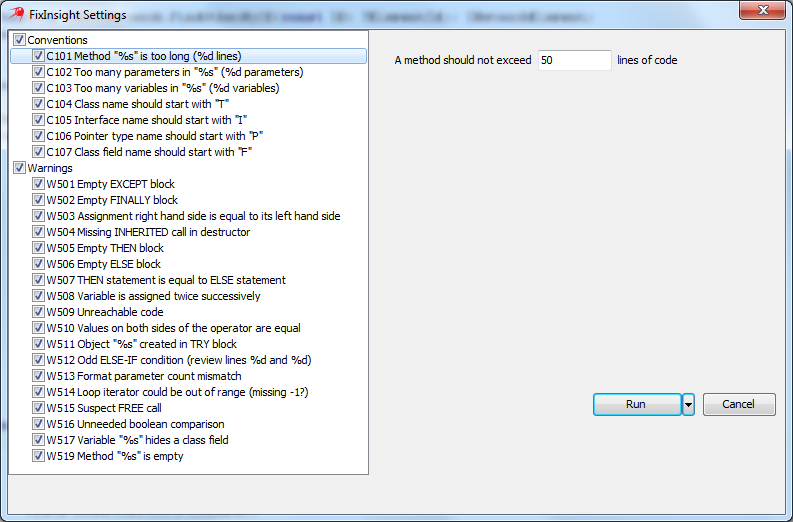
FixInsight by SourceOddity

There’s a long history of static code analysis tools for a variety of languages. I’m probably not the only one who remembers PC-Lint’s ancient print magazine advertisements, which had a C code snippet and asked you to spot the problem with it. A compiler, of course is an example of just this: its hints and warnings are unnecessary but useful output. It doesn’t have to emit them – it really only needs to emit errors – but we appreciate when it does.  Often, in fact, I personally wish that Delphi emitted more hints and warnings than it does.
There are a number of tools that analyze Delphi code and produce reports based on it (Icarus, Delphi Unit Dependency Scanner, ModelMaker’s Unit Dependencies, and Castalia might count as well) but only two products perform static analysis and report possible code errors.  They are Pascal Analyzer (which emits warnings of various strengths, which I’ve never used but which had a good short review here) and this new plugin, FixInsight. The person behind SourceOddity is Roman Yankovsky, a name you might recognise from the Delphi Developers G+ group or elsewhere.
source: http://parnassus.co/review-fixinsight-sourceoddity/

more:
http://sourceoddity.com/fixinsight/


Friday, March 20, 2015

Persian, Happy New Year, 1394

Persian, Happy New Year smile emoticon
1394

New Year begins, let us pray that it will be a year with New Peace, New Happiness and abundance of new friends, God bless you through out the New Year.
Although I'm not with you but my wishes will always stay with you on this New Year 1394. Happy New Year !


Tuesday, March 17, 2015

The BIGGEST RAD offer ever, exclusively until March 31. Act NOW!


Buy XE7 and get a free upgrade to the next major release. You'll also get Update Subscription for free until the next major release to keep you up to date with latest hotfixes, exclusive content, support and more. Purchase a qualifying RAD Studio, Delphi or C++Builder XE7 product by March 31, 2015 to get the next major release free!

http://www.embarcadero.com/radoffer

Thursday, March 5, 2015

Embarcadero MVP list updates


Embarcadero has released a new list of MVPs with new style of website !
I'm very happy to be on that list :)


Thursday, February 26, 2015


Buy XE7 and get a free Next Major Release to keep you up to date with latest hotfixes, exclusive content, support and more. Purchase a qualifying RAD Studio, Delphi or C++Builder XE7 product by March 31, 2015 to get the Next Major Release free!

Wednesday, February 25, 2015

D.P.F Delphi iOS Native Components v9.4.5

D.P.F Delphi iOS Native Components

New version:

v9.4.5 - 2015/02/26
  + Added TDPFAVAudioRecorder (Microphone Component)
  + Added TDPFDatePicker.MinuteInterval property
  + Added TDPFImageView.ResizeImage
  * Improved: TDPFQRCodeScanner now uses FMX ScreenOrientation
  - Fixed TDPFAVPlayer.StartPlayList once play

more...
http://sourceforge.net/projects/dpfdelphiios/

Saturday, February 14, 2015

Happy Birthday Delphi!


Delphi 20-year anniversary!

Who remembers this image ?


One of the best moments I was waiting for...!
Just saying " Thank you delphi ! "

Friday, February 13, 2015

Code Monkey in Code is live on YouTube now !

Jim McKeeth made this awesome video (and the source behind it)

 "Welcome to the download page for my Special Musical Number based on Code Monkey by Jonathan Coulton. Thanks to JoCo for licensing his song under Creative Commons CC-NC. My video is licensed underCreative Commons CC-NC-SA. You can freely share the video and build on it, just keep the sharing going, and provide attribution. Same for the code."
Jim McKeeth

See more...
http://delphi.org/CodeMonkey/


Thursday, February 12, 2015

D.P.F Delphi iOS Native Components v9.4.1

D.P.F Delphi iOS Native Components

v9.4.1 - 2015/02/12
  + Added TDPFHttp.PutData function
  + Added TDPFUITableView.OnCellClick Event
  + Added TDPFUITableView.OnCellLongClick Event
  + Added EKRecurrenceRule in EventKit
  + Added TDPFSegmentedControl change title font
  + Added TDPFAddressBook add contact to AddressBook
  + Added Visible Property in TTDPFSegmentedControlItem
  - Fixed TDPFUIViewController set RootViewController
  - Fixed GetCarrierInfo crash when Carrier not found!
  - Fixed TDPFNavigationController crash on resize (Thanks Gordon Hamm)
  - Fixed Removing Shadow
  - Fixed TDPFQLPreviewController Hide Toolbar
  * Improved FacebookSlideMenu


Wednesday, February 11, 2015

Adding a contact to iOS AddressBook using your Delphi application


Now, I want to learn how to add a contact to your iOS Phone AddressBook!
First download my last source code from :
https://sourceforge.net/p/dpfdelphiios/code/
and see AddressBookAdd demo,

I added AddAddressBook procedure to TDPFAddressBook component :


function TDPFAddressBook.AddAddressBook( FirstName: string; LatName: string; PhoneNumbers: array of TPhoneNumbers ): Boolean;
var
  Person               : ABRecordRef;
  error                : CFErrorRef;
  addressBook          : ABAddressBookRef;
  phoneNumberMultiValue: ABMutableMultiValueRef;
  venuePhoneNumbers    : NSMutableArray;
  I                    : Integer;
  s                    : string;
begin
  result      := false;
  addressBook := ABAddressBookCreateWithOptions( nil, &error );
  Person      := ABPersonCreate;
  if not Assigned( Person ) then
    exit;

  // FirsName & LastName
  result := ABRecordSetValue( Person, 0, PNSSTR( FirstName ), &error );
  if not result then
    exit;
  result := ABRecordSetValue( Person, 1, PNSSTR( LatName ), &error );
  if not result then
    exit;
  result := ABAddressBookAddRecord( addressBook, Person, &error );
  if not result then
    exit;

  // Phone
  phoneNumberMultiValue := ABMultiValueCreateMutable( kABMultiStringPropertyType );
  for I                 := low( PhoneNumbers ) to high( PhoneNumbers ) do
  begin
    if PhoneNumbers[I].PhoneLabel = '' then
      PhoneNumbers[I].PhoneLabel := kABPersonPhoneMainLabel;
    ABMultiValueAddValueAndLabel( phoneNumberMultiValue, PNSSTR( PhoneNumbers[I].PhoneNumber ), CFSTR( PhoneNumbers[I].PhoneLabel ), 0 );
  end;
  result := ABRecordSetValue( person, 3, phoneNumberMultiValue, nil );
  CFRelease( phoneNumberMultiValue );

  if not result then
    exit;

  // Save to AddressBook
  if ABAddressBookHasUnsavedChanges( addressBook ) then
    result := ABAddressBookSave( addressBook, &error );

  exit;
end;


for using this function, you can call like this:

procedure TFPeoplePicker.DPFAddressBook1RequestAccess( Sender: TObject; const Granted: Boolean );
var
  p: array [0 .. 2] of TPhoneNumbers;
begin
  P[0].PhoneNumber := '+98912xxxxx';
  P[0].PhoneLabel  := 'mobile';

  P[1].PhoneNumber := '+982188xxxxx';
  P[1].PhoneLabel  := 'work';

  P[2].PhoneNumber := '+982188xxxxx';
  P[2].PhoneLabel  := ''; // <-- contact’s primary number

  if Granted then
    DPFAddressBook1.AddAddressBook( 'Babak', 'Yaghoobi', p )
  else
    ShowMessage( 'Go to Setting->Privacy->Contacts and switch on this application' );
end;


Finally, see your phone contact list:


Enjoy Delphi iOS Native Programming !

Saturday, February 7, 2015

Making iOS Setting Bundle in Delphi !

Hi,

For making setting bundle in your Delphi iOS apps, you must be make a xml file named : Root.plist
and write some code like this:

<?xml version="1.0" encoding="UTF-8"?>

<!DOCTYPE plist PUBLIC "-//Apple//DTD PLIST 1.0//EN"     "http://www.apple.com/DTDs/PropertyList-1.0.dtd">

<plist version="1.0">
<dict>
    <key>PreferenceSpecifiers</key>
    <array>
        <dict>
            <key>Title</key>
            <string>D.P.F iOS Native Components</string>
            <key>Type</key>
            <string>PSGroupSpecifier</string>
            <key>FooterText</key>
            <string>Copyright, 2013-2015 D.P.F.&#xA;All rights reserved.</string>
        </dict>

        <dict>
            <key>DefaultValue</key>
            <string>7.9.5</string>
            <key>Key</key>
            <string>version_preference</string>
            <key>Title</key>
            <string>Version</string>
            <key>Type</key>
            <string>PSTitleValueSpecifier</string>
        </dict>

        <dict>
            <key>DefaultValue</key>
            <string>Babak Yaghoobi</string>
            <key>Key</key>
            <string>developed_preference</string>
            <key>Title</key>
            <string>Developed by</string>
            <key>Type</key>
            <string>PSTitleValueSpecifier</string>
        </dict>

        <dict>
            <key>DefaultValue</key>
            <string>bayaghoobi@gmail.com</string>
            <key>Key</key>
            <string>developed_preference</string>
            <key>Title</key>
            <string>eMail : </string>
            <key>Type</key>
            <string>PSTitleValueSpecifier</string>
        </dict>

        <dict>
            <key>DefaultValue</key>
            <string>Babak Yaghoobi</string>
            <key>Key</key>
            <string>Enabled_preference</string>
            <key>Title</key>
            <string>Enabled</string>
            <key>Type</key>
            <string>PSToggleSwitchSpecifier</string>
        </dict>
    </array>

    <key>StringsTable</key>
    <string>Root</string>
</dict>
</plist>


Now open Deployment windows and add this file in your deploy list, then change remote path :
\Settings.bundle\


Deploy project into Device or Simulator and press home button for closing app,
Go Phone Setting icon and scroll down to bottom, you must be see your app there !


Tuesday, February 3, 2015

News Delphi Week 2015

Delphi Week 2015 is a global online celebration of everything Delphi. Live, online sessions will occur Monday thru Friday, February 9-13, 2015 from 8am to 10am Pacific Time and 2pm to 4pm Pacific Time. 
WRITTEN BY JIM M

See more....